 Albania
 Argentina
 Australia
 Austria
 Belgium
 Bosnia and Herzegovina
 Brazil
 Bulgaria
 Canada
 Chile
Chile
 Colombia
 Croatia
 Czech Republic
 Denmark
 Estonia
 Finland
 France
 Germany
 Greece
 Hungary
 Ireland
 Italy
Italy
 Latvia
 Lithuania
 Luxembourg
 Mexico
 Moldova
 Montenegro
 Netherlands
 New Zealand
 North Macedonia
 Norway
 Philippines
 Poland
 Portugal
 Romania
 Serbia
 Slovakia
 Slovenia
 South Africa
 Spain
Spain
 Sweden
 Switzerland
 Turkey
 Ukraine
 United Kingdom
 United States of America



FL Studio vs Ableton — Which DAW Should You Buy First?
FL Studio or Ableton? Every aspiring music producer asks this question. Both DAWs are professional tools used by world-class producers, but they work differently, cost differently, and suit different people.
FL Studio vs Ableton
FL Studio and Ableton are professional DAWs (Digital Audio Workstations) — software for creating, recording, and mixing music. FL Studio is better for beginners thanks to its intuitive interface and lifetime license. Ableton is stronger for live performance and working with audio loops. If you are starting from scratch and want to make electronic music, trap, or hip-hop, start with FL Studio. If you are interested in live performance or audio sampling, choose Ableton.
What is a DAW and why do you need one?
A DAW is the software where modern music is made. You record instruments, add virtual sounds, compose beats, mix and master. Without a DAW, home music production is not possible. FL Studio and Ableton Live are two of the most popular DAWs in the world, used by beginners and professional producers alike. The difference lies in how they work and who they are designed for. To run either of them you also need an audio interface to connect your microphone or instrument to your computer.
FL Studio vs Ableton comparison
| FL Studio | Ableton Live | |
|---|---|---|
| Base version price | from ~€99 | from ~€99 |
| Full version price | ~€199 (Producer) | ~€349 (Standard) |
| Lifetime free updates | Yes | No |
| Piano Roll | One of the best | Functional, less intuitive |
| Live performance | Weaker | Strong, Session View |
| Audio recording (basic ed.) | Fruity: not available | All versions support it |
| Trial version | Free, no time limit | 90 days free |
| Operating system | Windows + Mac | Windows + Mac |
| Best for | Trap, hip-hop, EDM | Techno, house, live sets |
What is the difference between FL Studio and Ableton?
The main difference is in the approach to music creation. FL Studio uses a pattern-based workflow. You create short musical loops (beats, melodies) and save them as blocks that you then arrange on a timeline. Ableton Live works similarly but also has Session View, a grid where you can trigger and stop loops in real time. For studio production the difference is small. For live performance, Ableton Session View is irreplaceable.
Who is FL Studio for?
FL Studio is the right choice if: you are starting music production from scratch and want to learn quickly; you make electronic music, trap, hip-hop, or EDM; you do not want to pay repeatedly for updates since FL Studio has a lifetime license; you want to try it free before buying as the trial version has no time limit.
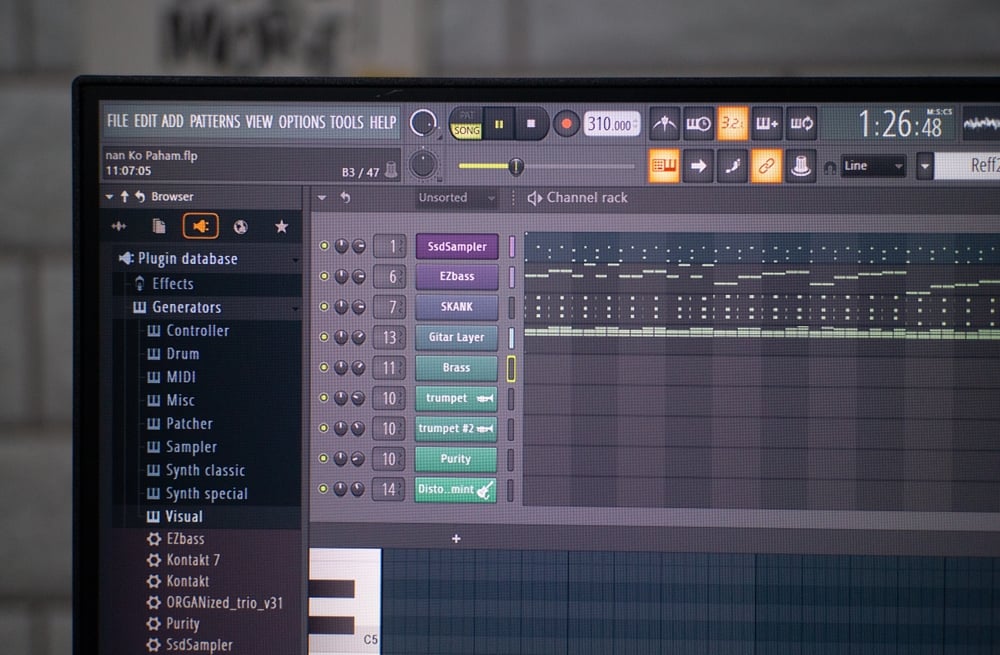
FL Studio has the best Piano Roll of any DAW. If you compose MIDI melodies and beats you will appreciate it immediately. That is why producers like Martin Garrix, Avicii, and Metro Boomin use it.
MUZIKER TIP: FL Studio Fruity Edition does not allow audio recording, only MIDI and virtual instruments. If you want to record vocals or guitar, get the Producer Edition.
FL Studio has the best Piano Roll of any DAW. If you compose MIDI melodies and beats you will appreciate it immediately. That is why producers like Martin Garrix, Avicii, and Metro Boomin use it.
MUZIKER TIP: FL Studio Fruity Edition does not allow audio recording, only MIDI and virtual instruments. If you want to record vocals or guitar, get the Producer Edition.
Who is Ableton Live for?
Ableton Live is the right choice if: you want to play live sets (DJing, electronic band, live electronics); you work a lot with audio sampling and loops; you want to make techno, house, ambient, or experimental electronics; you are comfortable with the higher price of the full version.
Ableton has the exceptional Warp feature, which can stretch or shrink an audio recording without losing quality and automatically aligns it to the tempo. For sampling and remixing this is a decisive advantage.
Ableton has the exceptional Warp feature, which can stretch or shrink an audio recording without losing quality and automatically aligns it to the tempo. For sampling and remixing this is a decisive advantage.
How much does FL Studio vs Ableton cost?
FL Studio — edition prices
| Edition | Price | What it includes |
|---|---|---|
| Fruity | ~€99 | Basic tools, no audio recording |
| Producer | ~€199 | Recommended — audio recording, full Piano Roll |
| Signature | ~€299 | + additional plugins and synthesizers |
| All Plugins | ~€499 | Everything including premium plugins |
All versions of FL Studio include lifetime free updates. Buy once and receive updates forever at no extra cost.
Ableton Live — edition prices
| Edition | Price | What it includes |
|---|---|---|
| Intro | ~€99 | Limited tracks and plugins |
| Standard | ~€349 | Recommended — full feature set |
| Suite | ~€749 | + Max for Live, all instruments and effects |
Ableton does not have lifetime updates. Upgrades to new versions are paid separately, usually €50 to €150.
Which DAW for which genre?
| Genre | Recommended DAW |
|---|---|
| Trap, hip-hop | FL Studio |
| EDM, future bass | FL Studio |
| Techno, house | Ableton |
| Drum and bass | Both (Ableton slightly ahead) |
| Ambient, experimental electronics | Ableton |
| Live electronic band | Ableton |
| Film music | Both |
| Complete beginner | FL Studio |
Do you need anything else with your DAW?
A DAW alone is not enough. For a full home production setup you need:
1. Audio interface. Without it you cannot connect a microphone or guitar to your computer with good quality. The built-in sound card in a laptop is not sufficient for production.
2. Studio headphones or active studio monitors. For mixing you need accurate sound since regular headphones are misleading. Studio headphones under €80 (for example AKG K240 or Audio-Technica ATH-M30x) are a good start. If you have a dedicated room, monitors give better spatial sound.
3. MIDI controller (optional). If you do not want to compose with only a mouse, a MIDI controller with keys will significantly speed up your production.
Find the full guide on what to set up first in the article How to start music production at home.
1. Audio interface. Without it you cannot connect a microphone or guitar to your computer with good quality. The built-in sound card in a laptop is not sufficient for production.
2. Studio headphones or active studio monitors. For mixing you need accurate sound since regular headphones are misleading. Studio headphones under €80 (for example AKG K240 or Audio-Technica ATH-M30x) are a good start. If you have a dedicated room, monitors give better spatial sound.
3. MIDI controller (optional). If you do not want to compose with only a mouse, a MIDI controller with keys will significantly speed up your production.
Find the full guide on what to set up first in the article How to start music production at home.
FAQ
Is FL Studio or Ableton better for beginners?
FL Studio is easier to learn for most beginners. It has a clearer interface, an excellent Piano Roll, and a trial version with no time limit. Ableton is also accessible for beginners, but its Session View can feel confusing at first.
Can I use FL Studio or Ableton for free?
Yes. FL Studio has a free trial version with no time limit. You cannot save projects but you can export. Ableton offers a 90-day free trial of the Suite version. You can download and try both before buying.
What is the price difference between FL Studio and Ableton?
FL Studio Producer Edition costs ~€199 and includes lifetime free updates. Ableton Live Standard costs ~€349 and new versions are paid separately. For long-term use FL Studio is more cost-effective.
Do I need an audio interface for FL Studio or Ableton?
It is not required but we recommend it. The built-in sound card in a computer has too much latency and low input quality. For recording a microphone or guitar you need an external audio interface.
Can FL Studio be used on Mac?
Yes. FL Studio supports macOS from version 20.7 onwards. It was historically Windows-only but today runs fully on Mac as well.
Which is better — FL Studio or Logic Pro?
Logic Pro is available only for Mac and costs ~€249 as a one-time purchase. It is excellent for recording live instruments and film music. FL Studio is available for Windows too and has a better Piano Roll. For electronic production FL Studio is stronger, for recording a band Logic Pro is the better choice.
What do famous producers use?
FL Studio: Martin Garrix, Avicii, Metro Boomin, Afrojack, Diplo, Soulja Boy. Ableton: Skrillex, Aphex Twin, Flying Lotus, Four Tet, Nine Inch Nails, Thom Yorke. The choice of DAW did not decide their careers. Talent and practice did.
Can I switch between FL Studio and Ableton?
Yes. Many producers use both simultaneously. FL Studio for creating beats and MIDI, Ableton for live performance or audio processing. You transfer projects between them via MIDI format or audio export.